
Use this page to enter the connection information required by your cellular provider such as the SIM PIN, username, and password. Not all providers require all these fields. Please contact your cellular provider or SIM card provider if you are unsure what connection information is required.
The APN provides the modem with the information needed to connect to the cellular provider’s network. If you select your Country and Provider from the dropdown menus, commonly used APNs for your provider will appear in the APN list dropdown menu.
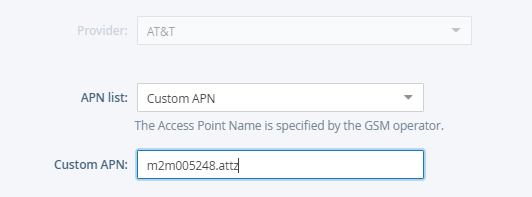
If you do not see the APN you need in the list, select “Custom APN” from the dropdown and enter the correct APN.
The Advanced options contain special parameters to modify the behavior of your modem. If you need to adjust these settings, check the Show advanced options checkbox.
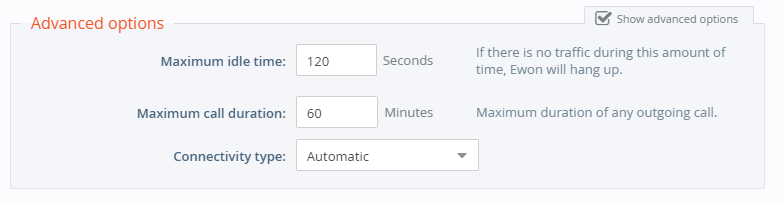
- Idle time before hanging up
-
Defines the amount of time in seconds after which the Ewon device will hang up if no data transfer occurs on the modem link
Under most circumstances, the keepalive exchange between the Ewon device and Talk2M will prevent this limit from being reached.
- Maximum outgoing call duration
-
Defines the maximum amount of time in minutes of any outgoing call. When this amount of time is reached, then the Ewon device stops the modem communication.
For permanent connections, you can increase this time to reduce the risk of disconnection during important communication.
You can also set this parameter to 0, which will deactivate the time limit for the connection
However, some cellular providers require occasional disconnection and reconnection.
- Connectivity type
-
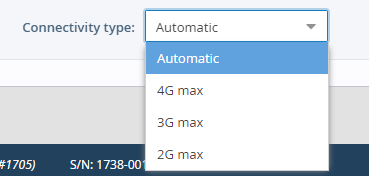
Allows you to limit what cellular network technology your modem will use.
This is typically used in situations where multiple cellular networks exist in the same location, but the older technology has the better reliability.
Under most circumstances, you can leave this field set to Automatic.
Click the Next button to continue to the next portion of the wizard.