
This screen allows you to configure the port forwarding of the Ewon gateway to Ethernet devices which are connected to its LAN interface.
It is similar to the Transparent Forwarding feature, but it only forwards certain ports instead of all ports in a range.
You do not need to set the gateway address in your LAN devices to the Ewon router’s LAN IP address.
Unlike many other network configuration settings, the proxy functionality can be enabled or disabled at any time without the need of a reboot or a WAN reconnection.
Check the Enabled checkbox to enable the proxy feature and to display the configuration.
In the Proxy External Interface (EXT) field, select the external interface where the proxy rules will be applied. Options are “WAN,” “VPN,” and “PPP incoming.”
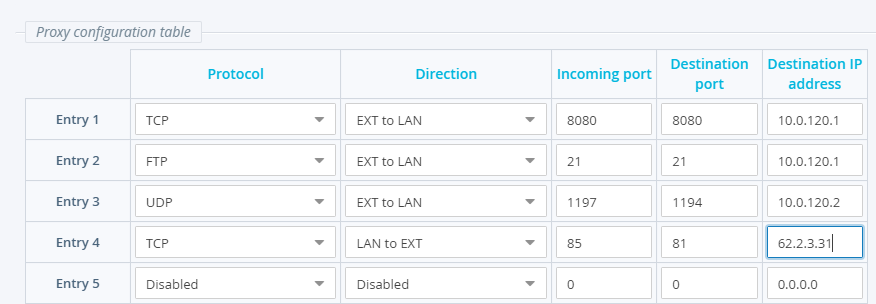
The Proxy Configuration Table supports up to 10 proxy rules.
For each entry, specify the Protocol, Direction, Incoming Port, Destination Port and Destination IP Address.
Although FTP is TCP, it must be specified in the Protocol field. The FTP proxy will work for both passive and active connections.
If the Protocol for an entry is set to "Disabled", then the full proxy entry will be disabled, regardless of the other entry parameters’ values.