Using Boolean OPC value types in Ewon by HMS NetworksStudio
Check out this article and learn how to use the WEBfactory 2010 Studio boolean OPC value types as Signals.
The OPC signals with boolean values are no different than other signals in Ewon by HMS NetworksStudio. Usually, the values of a boolean value type signal are 0 and -1. Ewon by HMS NetworksStudio can work with the default values, but in most cases, the desired boolean values to work with are 0 and 1.
In order to transform the boolean values of an OPC signal from 0 and -1 to 0 and 1, the X1, X2, Y1 and Y2 factors need to be adjusted in Ewon by HMS NetworksStudio:
By default, the X1 and Y1 factors have the value 0 and the X2 and Y2 factors have the value 100.
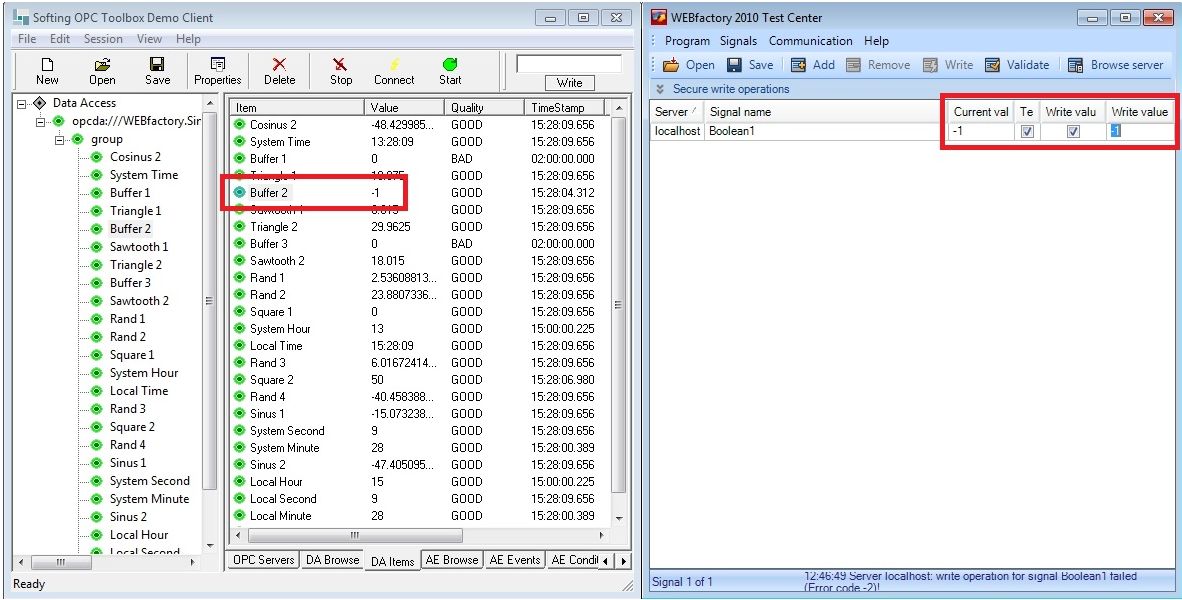
The value of the signal when the Y2 factor is default (100)
To transform the value -1 in 1, the Y2 factor needs to be adjusted as follows: Y2 = -100.
Important
To apply the changes made in Ewon by HMS NetworksStudio, restart the Ewon by HMS Networks Server using the Ewon by HMS NetworksService Manager!
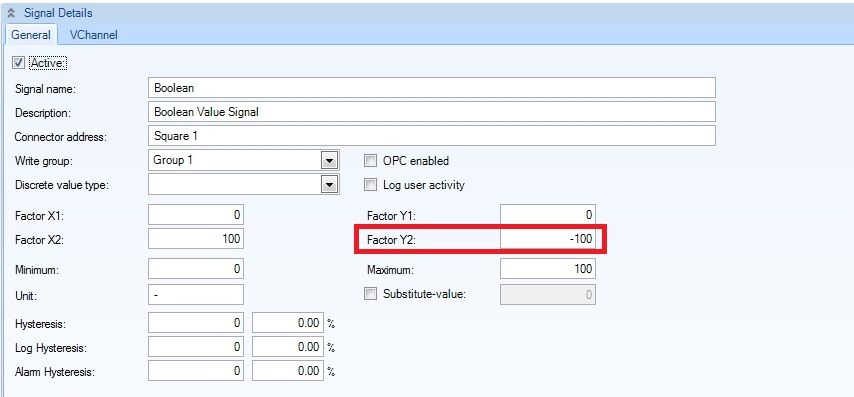
Transforming the boolean values
Having this adjustment performed in Ewon by HMS NetworksStudio, the signal value output will be 0 and 1:

The signal value in the OPC server when the Y2 factor equals -100